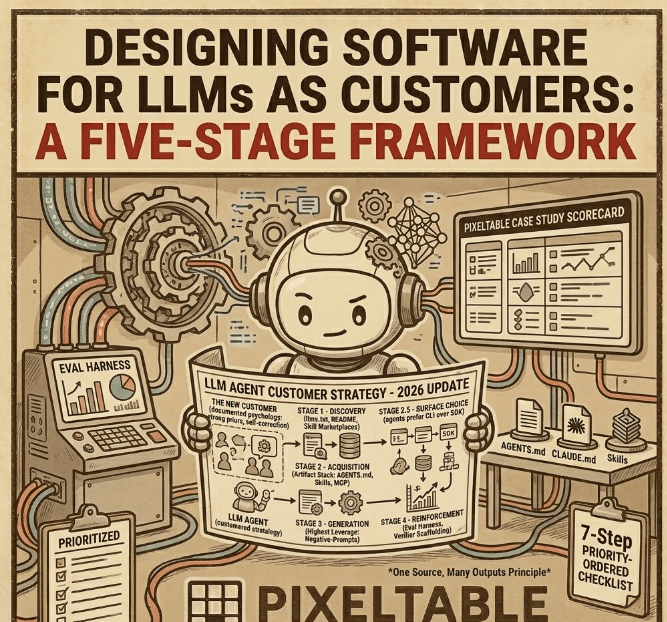

Summary: Software products now have a new ICP: the LLM coding agent. They install via pip or npx, evaluate via the README, "buy" by writing code, and increasingly prefer your CLI over your SDK because Bash is closer to their tool-call surface than Python imports. This post presents a five-stage framework for designing developer tools that serve AI agents as first-class customers. It is illustrated with the design decisions we made at Pixeltable, where the gap between agents' training-data priors and the product's actual shape makes every choice visible.
The New Customer You Did Not Hire a PM For#
Every developer tool now has two customer segments: humans who read docs and click buttons, and LLM agents that read README.md files, parse --help output, and write code. The second segment has a documented psychology:
- Strong priors from training data. If your framework is off-distribution from the dominant Python ecosystem (LangChain + pandas + standalone vector DB), agents will default to those patterns even when your API is better.
- No memory between sessions. Every conversation starts cold. Context must be re-acquired each time.
- Willingness to hallucinate plausibly. Agents will confidently invent APIs that look right but don't exist.
- Self-correction from machine-readable signals. Structured errors, exit codes, and lint output trigger fast recovery. Prose error messages do not.
These traits define a small set of design levers. We organized them into a five-stage journey.
The Five-Stage LLM-Customer Journey#
| Stage | What Happens | Design Goal | Primary Lever |
|---|---|---|---|
| 1. Discovery | Cold agent encounters your product | First search lands on idiomatic content | SEO, README, llms.txt, skill marketplaces |
| 2. Acquisition | Agent loads context into session | Doc is self-contained and opinionated | AGENTS.md, Skills, CLAUDE.md, MCP |
| 2.5. Surface Choice | Agent picks CLI vs SDK vs MCP | All three are first-class | CLI parity, MCP server, SDK |
| 3. Generation | Agent writes code | Idiomatic on first try | Negative prompts, smart errors, lint |
| 4. Reinforcement | Code runs, loop closes | Measurable feedback | Eval harness, structured errors, guardrails |
Stage 1: Discovery. What Cold Agents Actually Do#
Each platform has a deterministic cold-start behavior. Design around the actual behavior, not the wished-for one.
| Platform | Cold-Start Behavior | Surface to Invest In |
|---|---|---|
| Claude Code (vanilla) | WebSearch then fetch GitHub README | README first 50 lines |
| Cursor (vanilla) | Pattern-match training data; barely fetches | .cursorrules in starter kit |
| VSCode + Copilot | Heaviest training-cutoff dependency | .github/copilot-instructions.md |
| Codex CLI / Gemini CLI | Looks for AGENTS.md / GEMINI.md | Convention-named files in starter kit |
| ChatGPT / Claude.ai / Gemini web | Pure pretraining; optional web search | llms.txt indexed by search engines |
At Pixeltable, our first discovery investment was pixeltable.com/llms.txt: a machine-readable document that gives any web-searching agent the mental model, install command, and an idiomatic 5-line example. Our second was publishing to skill marketplaces. The Pixeltable Skill is available via npx skills add pixeltable/pixeltable-skill for Cursor and as a native Claude Code plugin.
Skill marketplaces are a real distribution surface. Listing on SkillHub, awesome-agent-skills, and the growing ecosystem of AI-agent registries is the 2026 equivalent of listing on package managers.
Stage 2: Acquisition. The Artifact Stack#
Different agents pick up different file conventions. The trap is maintaining ten slightly-different copies that drift. The solution: one source of truth, many generated outputs.
| Convention | Used By | Governance |
|---|---|---|
AGENTS.md | Codex, Cursor 1.6+, Copilot, Amp, Devin, Jules | Linux Foundation (AAIF) |
CLAUDE.md | Claude Code | Anthropic |
GEMINI.md | Gemini CLI | |
.cursorrules | Older Cursor | Cursor |
.github/copilot-instructions.md | VSCode + Copilot | GitHub |
Agent Skill (SKILL.md) | Claude Code, Codex CLI, Gemini CLI, Copilot, Cursor, Cline, Windsurf | Anthropic + OpenAI joint standard |
| MCP server | Any MCP host | Linux Foundation |
llms.txt | All web agents | De facto standard |
At Pixeltable, our SKILL.md is the canonical source. It covers all 25+ AI provider integrations, multimodal pipeline patterns, RAG, tool-calling agents, and production deployment. Every other convention file derives from it.
Practical tip for monorepos: Codex and Cursor 1.6+ recursively merge AGENTS.md from the current directory up to root. Use this for audience-scoped guidance. /AGENTS.md for contributors. /docs/sample-apps/AGENTS.md for app builders. /dashboard/AGENTS.md for frontend contributors. The Pixeltable Starter Kit ships AGENTS.md as the user-facing entry point.
Stage 2.5: Surface Choice. CLI, SDK, or MCP?#
Agent traces reveal a clear preference hierarchy: shell commands > MCP tools > writing-then-executing code. The reason is mechanical. Bash is closer to the tool-call surface than Python imports. Commands like gh, kubectl, aws, and docker are weekly wins in agent traces because they produce structured output, have distinct exit codes, and require zero import management.
This has a concrete implication: a first-class CLI moves you from a Python-only product to a Bash-first one.
CLI Design Principles for Agents#
| Principle | Why Agents Need It |
|---|---|
Stable JSON output mode (--json) | Parsing prose wastes tokens; JSON feeds directly into tool output |
| Distinct exit codes | 0=success, 2=user-fixable, 3=transient-retry lets agents auto-recover |
| stdout = data, stderr = chatter | Agents pipe stdout through jq; human-friendly banners pollute parsing |
| Non-interactive by default | Detect --yes or !isatty(stdin) and proceed without prompts |
Examples in --help epilog | Agents read help output; examples are 10x the signal of flag descriptions |
--dry-run on destructive ops | Agents preview before committing; prevents accidental data loss |
| Idempotency by default | Agents retry; non-idempotent operations cause data duplication or loss |
At Pixeltable, the pxt CLI already supports pxt serve for starting FastAPI services from a TOML config. We are expanding it to cover list, show, query, insert, and config, each with --json output and stable exit codes. The scaffolder uvx pixeltable-new myapp already supports --json for structured output that AI tools can parse programmatically.
Stage 3: Generation. Why Negative Prompts Are the Highest-Leverage Investment#
This is the richest design opportunity for any framework that is off-distribution from the dominant training corpus. And it is the most generalizable lesson in this entire framework.
Positive guidance ("use computed columns") is heard by an LLM as one option among many. Negative guidance ("do NOT iterate over rows; use computed columns instead") deflects the prior. The phrasing matters enormously. We wrote about why this matters in the context of vibe-coded AI apps breaking in production: when agents reach for LangChain + pandas + a separate vector DB, the resulting code looks reasonable but is architecturally hostile to the declarative model.
The Training-Distribution Biases LLMs Bring#
When an LLM encounters a multimodal AI task, it reaches for what it saw most during training. Here are the top biases and how to counter them:
| LLM's Prior Reaches For | Right Shape (Pixeltable) | Negative Prompt |
|---|---|---|
| LangChain / LlamaIndex / Haystack | create_view + add_embedding_index | "Do NOT use LangChain/LlamaIndex/Haystack" |
pandas.DataFrame as working store | Pixeltable table is the store | "Do NOT use pandas as working data; egress only" |
for row in ...: llm(row) | Computed column | "Do NOT iterate to call models" |
| Pinecone / Chroma / FAISS / Qdrant | t.add_embedding_index(...) | "Do NOT install a separate vector store" |
while not done: agent loop | Table where insert triggers chain | "Do NOT write while-loops for agentic flows" |
async def FastAPI endpoints | def (Pixeltable is sync) | "Do NOT use async def with Pixeltable" |
Recommendation for any framework author: put the top 5 macro-prompts in bold at the top of your skill file. Ship the remaining biases as a wrong/right reference table further down. Long lists buried mid-document get skimmed. Bold short lists at the top deflect priors. At Pixeltable, we ship exactly this structure in our SKILL.md: a "STOP" section with the top 5 negative prompts, followed by a full 15-bias reference table with wrong/right code examples.
Structured Errors: The One-Turn Self-Correction Pattern#
LLMs self-correct far better when errors are machine-readable. Compare:
The structured version gives the agent everything it needs to self-correct in one turn instead of three. When a --json mode is active, errors serialize as JSON tool-output. This is the difference between a 30-second recovery loop and a 3-minute spiral of increasingly wrong guesses.
The Complete Generation Lever Set#
| Lever | What It Is | Why It Works |
|---|---|---|
| Anti-pattern doc + Skill section | Stated negatively, side-by-side wrong/right | Retrievable from cold; deflects in-session priors |
| "Did you mean..." errors | Hallucinated APIs raise with canonical fix | Agents read errors and self-correct |
| Structured error format | code / suggestion / fix_example | One-turn self-correction vs. three-turn spirals |
pxt.lint() static checker | SDK ships with same rules as eval verifier | Agents self-check before committing |
| MCP sandbox | Run code before committing | Already shipped via our MCP server |
Stage 4: Reinforcement. The Eval Harness#
Without measurement, every Stage 1-3 intervention is a hypothesis. With measurement, you have a flywheel.
We built pixeltable-eval, an eval harness that measures how well AI coding agents write Pixeltable code under different context levels. It drives real agent runtimes (Claude Code via headless mode, Cursor via the SDK) through the full tool-use loop: file read/write, shell, web search, self-correction. These are not raw API calls. They are end-to-end agent sessions.
The harness ships 16 evals across 7 categories:
| Category | Evals |
|---|---|
| Fundamentals | create_table, computed_columns, embedding_index |
| RAG | pdf_rag, semantic_search |
| Video | frame_extraction |
| Agents | tool_calling |
| Idioms | computed_not_loop, no_langchain, no_pandas_store |
| Hard | error_recovery, incremental_update, multi_view_pipeline |
| Negative controls | raw_sql_query, simple_pandas_groupby, static_file_transform |
Each eval contains a TASK.txt (the literal prompt sent to the agent), an optional reference solution, and a grader with positive/negative patterns. The negative controls are tasks that should not use Pixeltable, verifying the agent does not cargo-cult import it everywhere.
R0 Spike: The Premise Validated#
We ran the R0 spike across three context levels. The results:
| Context Level | Pass Rate | Idiomaticity (0-5) | Hallucinations |
|---|---|---|---|
| Cold (no context) | 67% | 3.0 | 0.0 |
| + Agent Skill | 100% | 5.0 | 0.0 |
| + Skill + MCP | 100% | 4.8 | 0.0 |
Lift cold to Skill: +33 percentage points. The premise validated. The Skill moves code from "works but not idiomatic" to "fully idiomatic on first try."
We used a strict decision gate before committing to the full suite:
- Lift cold to Skill >= 30 percentage points: Premise validated. Commit to the full suite. This is where we landed.
- Lift 10-30pp: Skill content needs work before building more verifiers.
- Lift < 10pp: The Skill thesis is broken. Investigate before investing more.
- Variance > 25pp run-to-run: Rankings are noise. Need more reps before publishing.
Each verifier follows the same structure:
The key design choice: pxt.lint(), the same static checker developers use in their IDE, is also the scoring function the eval harness uses. One rule set, two consumers. Every lint rule improvement immediately improves both developer experience and eval scores. We wrote about this evaluation philosophy in our agent harness post.
Runtime Guardrails#
Agents will misuse your tools confidently. Bake in safety mechanisms:
| Guardrail | What It Prevents |
|---|---|
--dry-run flag / PXT_DRY_RUN=1 env | Accidental data destruction in agent loops |
Operation budget (PXT_MAX_ROWS, PXT_MAX_TOKENS) | Runaway computed-column chains |
Confirmation required for drop_* unless --yes | The most frequent regret in CLI-using agents |
| Schema-change preview before commit | Over-confident table restructuring |
The Pixeltable Case Study#
Pixeltable is a particularly revealing case study because the gap between agents' training priors and the product's actual shape is unusually wide. Agents reach for pandas + LangChain + Pinecone. The idiomatic Pixeltable shape is declarative tables with computed columns and inline embedding indexes. Every design intervention is visible because the delta is large.
Here is our current developer journey:
- Discover: Developers find us through pixeltable.com, docs, or GitHub. For agents, we publish
llms.txtandllms-full.txt. - Teach the AI assistant:
npx skills add pixeltable/pixeltable-skill. Works with Cursor, Claude Code, Windsurf, Copilot, and others. - Scaffold:
uvx pixeltable-new myappcreates a working project with schema, config, and Dockerfile. Three patterns:--serving(default),--backend,--batch. - Build:
pip install pixeltable. One install bundles database, orchestration, vector indexing, rate limiting, caching, and a local dashboard. - Serve:
pxt serve pipeline. Routes declared inpyproject.toml, zero web code required. - Deploy: Docker, Helm, Terraform, CDK configs in the Starter Kit. Or
pxt deployfor Pixeltable Cloud. - Explore with MCP: Our MCP server (32 tools, 13 resources) lets agents query tables, inspect schemas, and run code directly.
Current Scorecard#
| Capability | Status |
|---|---|
llms.txt: machine-readable product overview | Shipped |
| Agent Skill for all major IDEs | Shipped |
| MCP server (32 tools, 13 resources, 6 prompts) | Shipped |
Starter kit with AGENTS.md | Shipped |
| Migration guides (from DIY, RDBMS, agent frameworks) | Shipped |
| Anti-pattern negative prompts (top 5 in Skill + 15-bias reference) | Shipped |
General-purpose pxt CLI (list, show, query, --json) | In progress |
Structured error format with fix_example | Planned |
pxt.lint() static checker | Planned |
| Eval harness (pixeltable-eval): 16 evals, R0 spike validated | In progress (public leaderboard coming) |
The General Principle: Decision Types Matter#
Not all interventions carry the same risk. The framework for deciding how to decide matters as much as the decisions themselves:
| Axis | Decision Type | Discipline |
|---|---|---|
Discovery (marketplaces, llms.txt) | Type 2 (reversible) | Bias to action |
Acquisition (AGENTS.md, Skills) | Type 2 (reversible) | Bias to action |
| Surface area (CLI shape, API naming) | Type 1 (irreversible) | Bias to information first |
| Generation guardrails (errors, lint) | Type 2 (reversible) | Bias to action |
| Telemetry / data collection | Type 1 (brand risk) | RFC + community first |
| Eval methodology | Type 2 (publish/retract) | Bias to action after small spike |
The biggest mistake teams make is treating Type 1 decisions like Type 2. Shipping a CLI surface without usage data. Adding telemetry without an RFC. The second biggest mistake is the opposite: treating Type 2 decisions like Type 1. Spending months perfecting a Skill file when you could ship, measure, and iterate in a week.
The One Move That Matters Most#
Ship the eval harness publicly.
But do not start with a 10-story, 960-cell matrix. Start with a 2-day spike: one user story, one model, three context levels. The harness is privileged because it enables falsification of every other intervention. Without it, every doc and SDK change is a hypothesis with no test. With it, a flywheel. And a benchmark with your name on it.
Once you measure:
- It forces you to write down what "idiomatic" means for your framework.
- It generates shareable content every release.
- It makes every other intervention measurable.
- It gives Anthropic, OpenAI, and Google a reason to make their next model better at your tool. That is the only durable, training-time fix.
Getting Started: A Checklist for Any Developer Tool#
If you are building a developer tool and want to serve LLM agents as first-class customers, here is the priority-ordered checklist:
- Ship
llms.txtat your domain root. One page, machine-readable, with your mental model and a 5-line idiomatic example. - Write a Skill file. Cover the happy path, the top 5 anti-patterns as negative prompts, and a task router that maps intents to code patterns. Publish via
npx skills add. - Add
AGENTS.mdto your starter kit and template repos. Audience-scope it: contributors get one, app builders get another. - Design your CLI for agents.
--jsonoutput, distinct exit codes,--dry-runon destructive ops, examples in every--help. - Write negative prompts for the top 5 ways an LLM will misuse your API. State them as "Do NOT..." with the correct alternative.
- Add structured errors with
code,suggestion, andfix_examplefields. Make errors the best documentation. - Run a 2-day eval spike. One user story, three context levels. Measure whether your Skill actually helps.
The LLM agent is not a niche user segment. It is becoming the primary interface through which many developers first encounter your tool. Designing for it is not a nice-to-have. It is the new table stakes for developer experience.
Resources#
- Pixeltable llms.txt: machine-readable product overview for agents
- Pixeltable Skill: install with
npx skills add pixeltable/pixeltable-skill - Pixeltable Starter Kit: templates with
AGENTS.mdand deployment configs - pixeltable-new: scaffolder with
uvx pixeltable-new myapp - Pixeltable MCP Server: 32 tools for LLM-powered exploration
- Pixeltable Eval: 16 evals measuring agent code quality across context levels
- Pixeltable Documentation
- Pixeltable on GitHub