
Summary: Most AI apps start the same way: wire up S3, Postgres, Pinecone, FFmpeg, an orchestrator, and a hundred lines of glue code before you can even test a prompt. The Pixeltable Starter Kit replaces that entire stack with a single system. Clone the repo, add API keys, and you have a working multimodal AI application with document processing, cross-modal search, and a tool-calling agent, all backed by declarative tables.
Why We Built It#
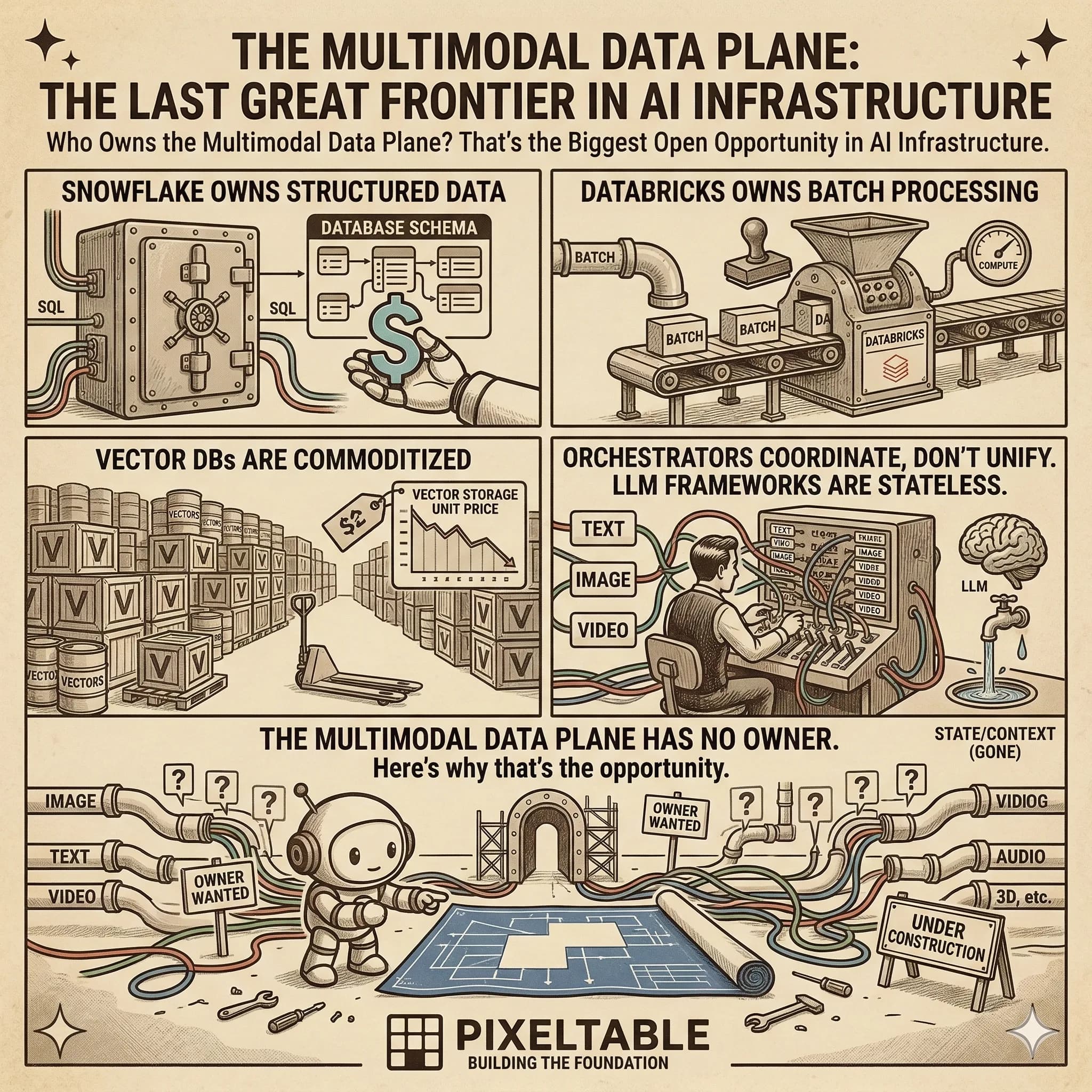
We kept hearing the same story: teams spend weeks assembling infrastructure before writing their first real feature. Object storage here, metadata DB there, vector store over there, media processing somewhere else, an orchestrator to tie it all together, and custom scripts to keep things in sync.
That patchwork is fragile. Add a new modality and you add a new service. Change an embedding model and you rebuild three pipelines. Debug a bad retrieval result and you trace through five systems.
The Starter Kit demonstrates a different approach: one system that handles storage, orchestration, and retrieval. Tables replace services. Computed columns replace pipelines. Embedding indexes replace vector databases. You focus on the AI logic; Pixeltable handles everything underneath.
What You Get Out of the Box#
The starter kit is a full-stack app (FastAPI + React) with three tabs that demonstrate Pixeltable's core patterns:
Data: Automatic Multimodal Processing#
Upload documents, images, and videos. Pixeltable automatically chunks text, extracts keyframes, transcribes audio, and generates thumbnails via computed columns and iterators. No Airflow DAGs. No processing queues. Just declare what you want computed and it happens on insert.
Search: Cross-Modal Similarity#
Search across all media types using embedding indexes. Text queries find relevant document chunks, similar images, and matching video frames, all from a single search interface backed by @pxt.query functions.
Agent: Tool-Calling AI with Persistent Memory#
Chat with a Claude-powered agent wired up entirely as Pixeltable computed columns. The agent pipeline is 8 steps and 11 computed columns: it routes queries, retrieves context via @pxt.query, calls tools, and returns answers, all declaratively defined. Every interaction is stored, versioned, and queryable.
Two Reference Architectures#
The repo demonstrates two distinct deployment strategies that cover most real-world needs:
1. Pixeltable as Full Backend (Long-Running)#
A persistent FastAPI + React app with Pixeltable handling all storage, processing, and retrieval. This is what you see in the starter kit's main directory. It's ideal for:
- Interactive AI applications (chatbots, search tools, dashboards)
- User-facing products that need persistent state
- Development environments where you iterate rapidly
2. Ephemeral Orchestration (Batch Processing)#
Spin up a container, ingest data, let computed columns process everything, export structured results to a serving DB via export_sql, route generated media to cloud storage, and shut down. No persistent infrastructure. This pattern lives in the orchestration/ folder and is ideal for:
- Batch media processing triggered by events (SQS, cron, webhooks)
- ETL pipelines that transform multimodal data into structured outputs
- Cost-sensitive workloads where you only pay for compute when processing
Quick Start: Running in 5 Minutes#
Prerequisites: Python 3.10+, Node.js 18+, and uv for dependency management.
That's it. No Docker required for development. No database to provision. Pixeltable manages its own storage locally by default.
Production: Docker to Kubernetes#
The starter kit includes production deployment configs for every major strategy:
| Method | When to Use | Folder |
|---|---|---|
| Docker Compose | Single server, local testing | docker-compose.yml |
| Helm | Any existing K8s cluster | deploy/helm/ |
| Terraform (EKS) | Provision cluster from scratch on AWS | deploy/terraform-k8s/ |
| Terraform (GKE) | Provision cluster on GCP | deploy/terraform-gke/ |
| Terraform (AKS) | Provision cluster on Azure | deploy/terraform-aks/ |
| AWS CDK (ECS Fargate) | Serverless containers | deploy/aws-cdk/ |
For Docker Compose, it's two commands:
Pixeltable data persists across restarts via named Docker volumes. For production media workloads, point Pixeltable at cloud storage:
What the Starter Kit Replaces#
Here's the stack a typical multimodal AI application requires, and what the starter kit eliminates:
| Traditional Stack | Pixeltable Starter Kit |
|---|---|
| S3 / GCS (blob storage) | Pixeltable tables with media columns |
| Postgres / MySQL (metadata) | Same Pixeltable tables |
| Pinecone / Weaviate (vectors) | Embedding indexes on columns |
| FFmpeg / custom scripts (media) | Built-in iterators & computed columns |
| Airflow / Dagster (orchestration) | Declarative dependency graph |
| LangChain / custom glue (LLM) | Provider-integrated computed columns |
| Custom API layer (serving) | @pxt.query → FastAPI routes |
Swap AI Providers in One Line#
The starter kit uses Anthropic for the agent and OpenAI for transcription. Embeddings run locally via HuggingFace. But Pixeltable integrates with 25+ providers, including Ollama, Gemini, Bedrock, Groq, Together, Fireworks, and more.
Swapping is a one-line change in your computed column definition. No routing layer, no adapter pattern, no config files.
Schema-Driven Infrastructure#
The starter kit embodies a principle we call schema-driven infrastructure: your table schema IS your infrastructure specification. Define columns, computed expressions, and embedding indexes. Storage, processing pipelines, vector search, and HTTP serving all materialize automatically.
This is the same idea Vercel brought to frontends ("framework-driven infrastructure"), applied to AI backends. The entire backend of the starter kit (storage, orchestration, retrieval, and serving) is declared in one setup_pixeltable.py file. The FastAPIRouter then exposes those declarations as production-ready HTTP endpoints with zero boilerplate.
Designed for AI-Assisted Development#
The starter kit includes an AGENTS.md file, an architecture guide specifically for AI coding assistants. Combined with Pixeltable's LLM development docs, MCP Server, and llms.txt, you can point your AI coding tool at the project and it understands the architecture immediately.
This isn't a toy demo. It's designed as a starting point you actually ship from.
Project Structure at a Glance#
Get Started#
The Pixeltable Starter Kit is open source (Apache 2.0) and ready to clone:
- GitHub Repository: Clone and start building
- Pixeltable Docs: Full API reference and guides
- Pixeltable Core: The engine underneath
- Discord Community: Ask questions, share what you build
If your next AI project involves documents, images, video, or agents, and you'd rather write features than infrastructure, give the starter kit a try. It's one git clone away from a working production architecture.